What is an Office Manager?
An Office Manager is a crucial role within any organization, acting as the central hub that keeps everything running smoothly. They are responsible for a diverse range of administrative and operational tasks, ensuring the office environment is efficient, organized, and conducive to productivity. The duties of an Office Manager are broad and can vary depending on the size and nature of the company. They often include managing office supplies, handling vendor relationships, overseeing administrative staff, coordinating schedules, and assisting with budgeting. Their role is vital for maintaining a positive and productive work environment, supporting both employees and management by handling the day-to-day operations that allow the business to function seamlessly. Office managers are the gatekeepers of the office, and their ability to juggle multiple responsibilities is essential to the company’s success.
Skills Office Managers Need
To excel in this role, Office Managers need a specific skillset. These skills encompass both hard and soft skills. Hard skills include proficiency in office software (Microsoft Office Suite, Google Workspace), budgeting and financial management, data entry, and record keeping. Soft skills, on the other hand, are just as important, if not more so. These include excellent communication skills (both written and verbal), strong organizational abilities, time management, problem-solving skills, and the ability to multitask effectively. Leadership qualities are also vital, as Office Managers often oversee other administrative staff and need to be able to delegate tasks, provide guidance, and motivate their team. A successful Office Manager also demonstrates strong interpersonal skills, adaptability, and a proactive approach to problem-solving. They must be able to handle confidential information with discretion, prioritize tasks effectively, and remain calm under pressure.
Essential Elements of an Office Manager Cover Letter

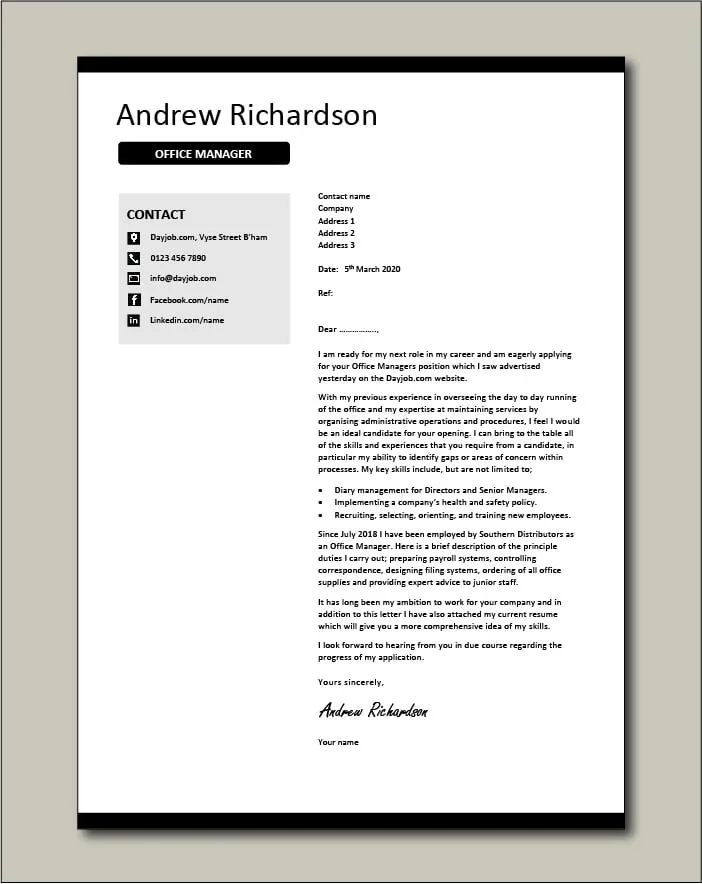
A well-crafted cover letter is your first impression. It is your opportunity to showcase your skills and experience, and to demonstrate why you are the ideal candidate for the Office Manager position. There are several essential elements that every Office Manager cover letter must include to be effective. It needs to be structured logically, starting with your contact information and the date. Then, followed by the employer’s details, the salutation, and the body of the letter. The body should highlight your most relevant experience, quantify your accomplishments, emphasize your key skills, showcase your personality, express your enthusiasm for the role, and end with a strong call to action. Finally, the letter should include a professional closing and your signature. Each element is designed to provide the hiring manager with a clear picture of your capabilities and your suitability for the position.
Contact Information
At the top of your cover letter, start with your contact information. This ensures the hiring manager can easily reach you. Include your full name, phone number, email address, and LinkedIn profile URL (optional). Make sure your email address is professional-sounding. Double-check the accuracy of your contact details to avoid any missed opportunities.
Date and Employer’s Details
Below your contact information, include the date of the cover letter. Then, provide the employer’s details, including the hiring manager’s name (if known), their title, the company name, and the company’s address. Addressing the hiring manager by name, rather than using a generic salutation, personalizes the letter and shows that you have taken the time to research the company and the role. If you are unable to find the hiring manager’s name, research the company’s website and LinkedIn to see if it is listed.
Salutation

The salutation sets the tone for your cover letter. If you know the hiring manager’s name, use a formal salutation such as “Dear Mr./Ms. [Last Name].” If you do not know the hiring manager’s name, a general salutation like “Dear Hiring Manager” or “Dear [Company Name] Team” is acceptable. Avoid generic salutations, such as “To Whom It May Concern,” as they lack personalization. Ensure that you spell the hiring manager’s name correctly; if it is misspelled, it can damage your chances of getting the job.
Opening Paragraph
Your opening paragraph is your first chance to capture the hiring manager’s attention. Clearly state the position you are applying for, and where you found the job posting. Briefly mention why you are interested in the role and the company. Express enthusiasm for the opportunity and make a strong first impression. You may want to include a brief, compelling statement that highlights your most relevant skill or experience. The goal is to hook the reader and make them want to continue reading your letter.
Highlight Relevant Experience
In the body of your cover letter, highlight your most relevant experience. Focus on the experience that aligns with the requirements of the Office Manager position as listed in the job description. Provide specific examples of your accomplishments and how your skills have benefited previous employers. Use action verbs to describe your responsibilities and achievements. Tailor your content to match the job requirements, as this shows the hiring manager that you have read the job description carefully and understand what they are looking for in a candidate. Use a few paragraphs to describe this.
Quantify Accomplishments

Whenever possible, quantify your accomplishments. Use numbers and data to demonstrate the impact of your work. For example, instead of saying “Improved office efficiency,” say “Improved office efficiency by 15% by implementing a new filing system.” Quantifying your achievements provides concrete evidence of your abilities and demonstrates the value you can bring to the company. These types of accomplishments can make your cover letter stand out from the crowd. Highlighting quantifiable results will make your qualifications more impressive.
Emphasize Skills
Emphasize the skills that are most relevant to the Office Manager position. Refer back to the job description and identify the key skills and qualifications the employer is seeking. Then, in your cover letter, explicitly mention these skills and provide examples of how you have used them in previous roles. Some key skills to emphasize are organizational skills, communication skills, problem-solving abilities, time management, and proficiency in relevant software. Make sure that you have an understanding of the most important skills listed in the job description, and that you include those skills in your cover letter to improve your chances.
Showcase Personality
While maintaining a professional tone, your cover letter should also showcase your personality. Let your enthusiasm and passion for the role and the company shine through. Use a friendly, approachable writing style. You can do this by mentioning specific aspects of the company that interest you, or by sharing a brief anecdote that demonstrates your work ethic or your approach to problem-solving. However, make sure that you stay professional. The goal is to make the hiring manager connect with you on a personal level, and show them that you would be a great fit for their company culture.
Express Enthusiasm

Throughout your cover letter, express your enthusiasm for the Office Manager position and the company. Show the hiring manager that you are genuinely interested in the opportunity and excited about the prospect of joining their team. You can do this by mentioning specific aspects of the company’s work that appeal to you. Mentioning something that you know about the company also indicates that you have done your research. Also, explain why you are drawn to the role, and how your skills and experience align with the company’s needs. Ensure the hiring manager knows that you are eager to contribute to their success.
Call to Action
Conclude your cover letter with a strong call to action. Clearly state your interest in the position and your desire to be interviewed. Express your confidence that your skills and experience make you a strong candidate. Provide your contact information and encourage the hiring manager to reach out to you. You can also mention your availability for an interview. By including a call to action, you encourage the hiring manager to take the next step and consider you for the position.
Closing and Signature
End your cover letter with a professional closing, such as “Sincerely,” “Best regards,” or “Thank you.” Then, leave space for your handwritten signature, followed by your typed name. If you are submitting your cover letter electronically, you can simply type your name. Ensure that your closing is appropriate for the tone of your letter. The closing should be formal and convey professionalism. Double-check your closing and signature to make sure they are properly formatted and free of errors.
Formatting Your Cover Letter

Formatting is an important part of your cover letter. Use a professional and easy-to-read font, such as Times New Roman, Arial, or Calibri, with a font size of 10-12 points. Use standard margins (1 inch on all sides). Keep the letter concise and limit it to one page. Use clear headings, bullet points, and white space to make it easy to read and navigate. A well-formatted cover letter is visually appealing and demonstrates your attention to detail. Properly formatted cover letters show that you care about making a good impression, and that you take the time to produce quality work.
Proofreading and Editing
Before submitting your cover letter, proofread it carefully. Check for any typos, grammatical errors, and formatting issues. A cover letter with errors can damage your credibility and make a negative impression on the hiring manager. Read the letter out loud to catch any errors that you might have missed. Consider asking a friend, family member, or career counselor to review your cover letter. A second pair of eyes can help you catch errors that you might have overlooked. Make sure that your cover letter is perfect before you submit it to the hiring manager.
Tailoring Your Cover Letter
Tailor your cover letter to each job application. Do not use a generic cover letter. Instead, customize your cover letter to match the specific requirements of the Office Manager position you are applying for. Review the job description carefully and identify the key skills, qualifications, and responsibilities. Then, highlight your relevant experience and skills in your cover letter, and provide specific examples of how you have met similar challenges in the past. Customizing your cover letter demonstrates that you have taken the time to understand the company’s needs and that you are a good fit for the role.
Cover Letter Examples

Reviewing examples can provide you with a better understanding of how to structure and write an effective Office Manager cover letter. Here are three examples of how to structure your cover letter.
Example 1
This example focuses on showcasing strong organizational skills and experience in office management. (Example Cover Letter Content)
Example 2
This example highlights experience in team management, communication, and problem-solving. (Example Cover Letter Content)
Example 3
This example emphasizes the candidate’s experience with financial management and vendor relations. (Example Cover Letter Content)
Common Mistakes to Avoid
There are some common mistakes to avoid when writing your cover letter. By knowing the mistakes and avoiding them, you can ensure that you increase your chances of getting hired.
Generic Language
Avoid using generic language. Use specific examples and data to support your claims. Instead of saying “I am a good communicator,” provide an example of a time when you effectively communicated with a team. Generic language is often vague and does not provide the hiring manager with a clear picture of your abilities. A cover letter should be personalized to show the hiring manager that you are the best fit for the job.
Typos and Grammatical Errors
Typos and grammatical errors can make a negative impression on the hiring manager. Always proofread your cover letter carefully before submitting it. A cover letter riddled with errors suggests that you lack attention to detail. Before submitting your cover letter, consider using a grammar checker to ensure that your letter is perfect.
Lack of Personalization
Avoid using a generic cover letter and failing to tailor it to the specific job. Your cover letter should be customized to match the requirements of the Office Manager position you are applying for. The hiring manager will easily identify the cover letters that are not personalized to the specific job requirements. A personalized cover letter shows that you are genuinely interested in the role and that you have taken the time to understand the company’s needs.
Ignoring the Job Description
Carefully read the job description and address the requirements in your cover letter. If you do not do so, you may miss the opportunity to highlight your qualifications, which will result in the hiring manager dismissing your application. If you have the skills, make sure you include them in your cover letter. Ignoring the job description can decrease your chances of getting an interview. Tailoring your cover letter to address the requirements of the job description shows the hiring manager that you are a good fit for the role.
Submitting Without Proofreading
Submitting a cover letter without proofreading is a major mistake. Always proofread your cover letter carefully for typos, grammatical errors, and formatting issues. Proofreading ensures that the final product is perfect. A cover letter that contains errors can make a negative impression on the hiring manager and can decrease your chances of getting hired. Be sure to take the time to carefully proofread your cover letter before submitting it to the hiring manager.
Final Tips for Success
Here are a few final tips to help you succeed. These simple, yet important tips can help you make the perfect cover letter.
Research the Company
Before writing your cover letter, research the company and the specific Office Manager position. Understand the company’s values, mission, and culture. This will help you tailor your cover letter to the company’s needs. When you write your cover letter, you can mention these specific things, and the hiring manager will see that you took the time to understand their company. Showing a specific interest will make your chances of getting an interview higher.
Use Action Verbs
Use action verbs to describe your experience and accomplishments. Action verbs help to make your cover letter more engaging and dynamic. They also make it easier for the hiring manager to visualize your skills and experience. Action verbs such as ‘managed,’ ‘coordinated,’ ‘implemented,’ and ‘achieved’ will make your cover letter stand out. By using action verbs, you can effectively showcase your abilities and make your cover letter more impactful.
Keep it Concise
Keep your cover letter concise and to the point. Hiring managers are busy and often have to review many cover letters. Get to the point quickly, highlighting your most relevant skills and experience. Avoid using jargon or overly complex language. Strive to keep your cover letter to one page. The hiring manager will appreciate a clear and concise presentation of your qualifications.
Follow Up
After submitting your cover letter and resume, follow up with the hiring manager to express your continued interest in the position. Follow up with the company within a week or two of submitting your application. A follow-up email or phone call demonstrates your enthusiasm and your commitment to the role. When you contact the company, make sure to be professional, and thank the hiring manager for their time. If you do not follow up, you risk the hiring manager forgetting you.