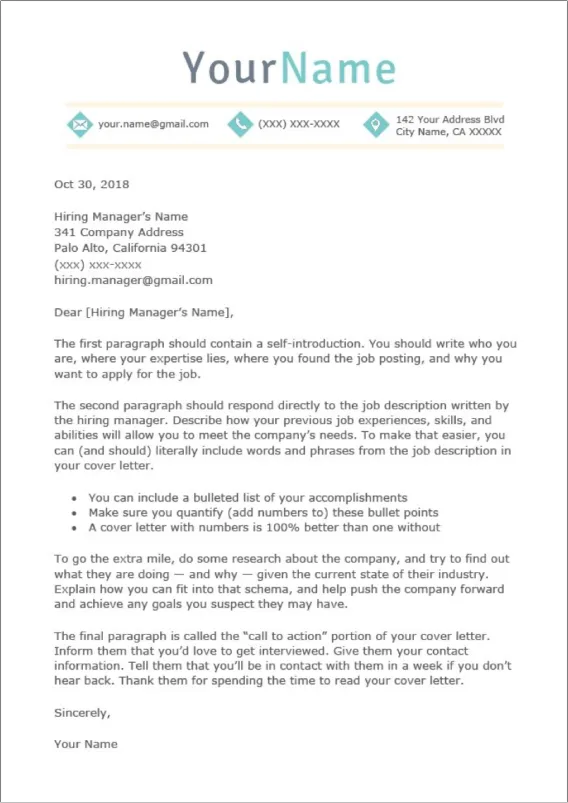
What is a Word Cover Letter Template?
A Word cover letter template is a pre-designed document created in Microsoft Word, offering a structured framework for crafting professional cover letters. These templates provide a foundation, including sections for contact information, a salutation, body paragraphs, and a closing. The primary function of a template is to save time, providing a starting point that can be customized to match individual qualifications and the specific requirements of each job application. By using a template, job seekers can avoid the need to start from scratch, ensuring their cover letter adheres to professional formatting standards and includes the essential elements that hiring managers expect. The adaptability of a Word template makes it possible to create multiple versions tailored for different roles, boosting the chances of success.
Benefits of Using a Word Cover Letter Template
The advantages of utilizing a Word cover letter template are numerous, primarily revolving around efficiency and professionalism. First and foremost, templates streamline the writing process, dramatically reducing the time and effort required to create a cover letter. This is particularly beneficial when applying for multiple positions simultaneously. Templates also ensure consistency in formatting, helping to present a polished and professional document that reflects positively on the applicant. Additionally, templates often include helpful prompts and guidance, making it easier to structure content effectively. These tools assist in highlighting key skills, experience, and achievements in a clear and concise manner, boosting the chances of getting noticed by recruiters. Moreover, many templates are readily available for free download, making professional cover letter creation accessible to everyone.
Key Components of a Winning Cover Letter Template

A winning Word cover letter template incorporates several key components to effectively communicate your qualifications and enthusiasm. These essential elements, when properly utilized, will significantly boost the effectiveness of the cover letter. The structure includes a header with your contact details, a professional salutation, well-crafted body paragraphs that highlight relevant experience and skills, and a strong closing. It also includes detailed guidelines for customizing each section to reflect the specific job requirements. The best templates are those that allow you to articulate your value proposition clearly. The components should guide you in showcasing your personality and eagerness for the position, making a lasting impression on the reader. Proper organization and content will ensure the cover letter presents a compelling narrative that encourages the hiring manager to review your resume.
Header Section
The header section is a critical element of a cover letter, setting the tone and providing essential contact information. It should begin with your full name, followed by your address, phone number, and email address. The header should be consistently formatted and clearly displayed, ensuring that the hiring manager can easily contact you. This section plays an important role in the first impression your cover letter creates. Some templates will incorporate a professional design, possibly including a small logo or tasteful color scheme, to enhance visual appeal. Ensure that the information is accurate and up-to-date to prevent any communication issues. Maintaining a clean and professional look in the header helps to demonstrate attention to detail and organizational skills, making a positive impact right away. For more formal applications, it’s wise to ensure the design does not distract from the content.
Applicant’s Contact Information
Within the header, the applicant’s contact information must be accurate and up-to-date. Include your full name, professional-looking email address, phone number, and optionally, a link to your LinkedIn profile or online portfolio. The consistency of the information in the header is important as it is used as a reliable means for the hiring team to contact you. Check the accuracy of all provided details, making sure the information is easy to read and find. Using a professional email address is critical; avoid nicknames or unprofessional usernames. Ensure your voicemail greeting is also professional. Presenting your contact details in a clean and straightforward manner will enhance the credibility of your application, highlighting your professionalism and attention to detail, making it easier for recruiters to reach out.
Date

The date is an important component of the cover letter header, generally placed right below the applicant’s contact information or the recipient’s details. The date usually indicates when you wrote the cover letter, providing a formal record. It’s essential to use the current date, which shows that the application is recent and relevant. The date’s format should align with standard business practices, such as Month Day, Year. Including the accurate date on the cover letter helps with organization. The date helps the potential employer understand the timeliness of your application and the period you are applying. Consistent use of the correct date on your cover letter helps to maintain professional standards and demonstrates that you’re attentive to the details.
Recipient’s Contact Information
The recipient’s contact information is also included in the header, typically beneath the date. This includes the hiring manager’s name, job title, company name, and address. When you know the name of the hiring manager, it’s always best to address the cover letter to them directly; however, it is acceptable to use ‘Dear Hiring Manager’ if you cannot find the name. The accurate recipient information is essential for the cover letter. If the information is not available, research the company website or LinkedIn to find it. Make sure this information is correct to ensure your application reaches the right person and makes a positive first impression. Proper identification of the recipient indicates your commitment to the role and the effort you put into your job search, leaving a positive impression.
Body Section
The body of the cover letter is the core of the message, where you showcase your skills, experience, and enthusiasm. It is composed of several paragraphs, each with a specific purpose: opening, highlighting relevant skills and experience, showcasing achievements, expressing enthusiasm, and a call to action. The body section is where you make a case for why you are the ideal candidate. The content should be tailored to the job description, emphasizing how your qualifications align with the requirements. This is where the cover letter provides a chance to tell a story. The body should be concise and to the point, with each sentence having a clear purpose. The overall tone should be professional yet personable, reflecting your interest in the company and the position.
Opening Paragraph Hook the Reader

The opening paragraph sets the tone for your cover letter, and it is crucial to capture the hiring manager’s attention immediately. Start by stating the position you are applying for and where you found the job posting. Then, include a brief, impactful statement that highlights your key qualifications or a relevant achievement. The opening should express your interest and enthusiasm for the role and the company. Avoid generic opening lines. Make your introduction unique, indicating that you have done your research on the role and the organization. If you know someone within the company, mention the connection, creating a personal touch. The primary purpose of the opening paragraph is to encourage the reader to continue reading, making them eager to learn more about your experience and qualifications.
Highlighting Relevant Skills and Experience
In the subsequent paragraphs, delve into your most relevant skills and experiences. Focus on how your qualifications align with the requirements outlined in the job description. Support your claims with specific examples and quantifiable results whenever possible. Illustrate how you have successfully used your skills in previous roles. Tailor your content to match the specific needs of the position. Using keywords from the job description within your cover letter will also improve your chances. Provide clear, concise examples that show how you can bring value to the organization. Emphasize accomplishments that demonstrate your ability to perform the job effectively, establishing credibility and making a strong case for your candidacy. Using this method makes it easier for the hiring manager to evaluate your capabilities.
Showcasing Achievements and Quantifiable Results
Highlighting your achievements and quantifiable results can significantly impact your cover letter’s effectiveness. Instead of simply listing your responsibilities, use metrics and numbers to demonstrate the impact of your work. For instance, describe how you increased sales by a certain percentage, reduced costs, or improved customer satisfaction scores. Use the STAR method (Situation, Task, Action, Result) to structure your examples, clearly conveying the context, the tasks you were assigned, the actions you took, and the results you achieved. Providing concrete examples of your accomplishments will create a powerful case that your skills and experience align with the job’s requirements. Including quantifiable results demonstrates your ability to make a tangible impact, distinguishing you from other applicants and showing you’re more than capable of contributing to the company’s success.
Expressing Enthusiasm for the Role and Company

Demonstrate your genuine enthusiasm for the role and the company. Show that you have done your research by mentioning specific aspects of the company that interest you. Explain how your career goals align with the company’s mission and values. Use the cover letter to convey your eagerness to contribute to the organization’s success. This section is an opportunity to express your passion for the job. Your enthusiasm should come through naturally, revealing your interest and commitment to the position and, by extension, the company. Referencing company-specific projects or initiatives also helps demonstrate your knowledge. Your authentic interest can significantly enhance your candidacy, setting you apart from candidates who appear to be just applying for a job.
Call to Action Encourage a Response
Include a clear call to action in your closing paragraph to encourage the hiring manager to take the next step. Specifically, express your interest in an interview and thank the hiring manager for their time and consideration. Provide your contact information again and make yourself available for a call or meeting. The call to action demonstrates your eagerness to move forward and reinforces your professionalism. Ensure that your availability for an interview aligns with their preferred timeline. By including this call to action, you guide the hiring manager to the next step, increasing the likelihood of receiving an interview offer. The call to action should be confident and positive, reflecting your excitement about the opportunity.
Closing Paragraph
The closing paragraph should summarize your interest in the role and thank the hiring manager for their time. Reiterate your enthusiasm and briefly mention your key skills and qualifications. The closing should leave a positive and lasting impression. Keep the closing brief and professional, ending with a polite and formal closing such as ‘Sincerely’ or ‘Best regards,’ followed by your name. Proofread the closing carefully to ensure that it’s free of errors. The closing should be as professional as your introduction, ending the document on a high note. The closing is the final point of contact and a well-written closing solidifies a strong impression.
Formatting Tips for Word Cover Letter Templates

The format of your Word cover letter template is essential for making a strong first impression. Proper formatting enhances readability and conveys professionalism. Good formatting involves font selection, margin settings, spacing, and overall design. Formatting can make or break the first impression, showing how well you can present your work. The formatting tips below will help you create a polished, visually appealing document that highlights your application. A well-formatted cover letter shows that you pay attention to detail, which is a significant asset in any professional setting. With these tips, you will create a cover letter that impresses employers, helping you get a job.
Font and Style
Choosing the right font and style is an important step for creating a professional cover letter. Use a clear, easy-to-read font such as Times New Roman, Arial, or Calibri. Maintain a consistent font throughout the document to create a uniform and organized look. Font size should typically be between 10 and 12 points for easy readability. Use bolding, italics, and underlining sparingly. Don’t use different fonts, which distracts from the content. A consistent, professional font adds to the cover letter’s overall presentation. The font and style you choose must be appropriate. Choose fonts that look professional, ensuring that your document remains easy to read and visually appealing.
Margins and Spacing
Proper margins and spacing are vital for creating a clean and organized cover letter layout. Set margins to one inch on all sides to ensure the text is well-balanced on the page. Utilize single or 1.15 line spacing. Use consistent spacing between paragraphs to improve readability. The use of proper margins ensures that the content does not look cramped or squeezed, and helps maintain the overall presentation. Ensure that your cover letter is visually pleasing. This will provide a structured layout that is easy to read. Make sure that there is enough white space between sections to improve visual appeal. Well-defined margins and spacing make the cover letter look cleaner and more professional.
Proofreading and Editing

Proofreading and editing are crucial steps for your cover letter. Carefully check your cover letter for any spelling, grammatical, or punctuation errors. Errors will harm your credibility. Proofread it multiple times, and consider asking a friend or colleague to review your work. Make sure the language is clear, concise, and easy to understand. Review the content of your cover letter to verify that it is relevant to the job requirements. Proper editing shows that you pay attention to detail. A well-edited cover letter makes a positive impact on the hiring manager, increasing your chances of getting an interview. To catch errors, read the cover letter aloud. Proofreading and editing are essential to ensure that your cover letter is free of mistakes.
How to Customize Your Word Cover Letter Template
Customizing your Word cover letter template is crucial for tailoring it to each job application. First, begin by reading the job description thoroughly to understand the required skills and experiences. Then, highlight the keywords and match them with your skills and experiences. Tailor the opening paragraph to express your interest in the specific role and company. Adjust the body paragraphs to showcase your relevant achievements and accomplishments. Remember to modify the closing paragraph and customize your contact information. A well-customized cover letter demonstrates your interest in the position, differentiating you from generic applicants. Customizing will help demonstrate to the employer you’re genuinely interested and have the abilities needed.
Adapting to Different Job Applications
Adapt your cover letter template to align with the requirements of different job applications. Tailor your cover letter to showcase your skills. Highlight the skills and experiences most relevant to the role. Research the company and incorporate their mission and values to express your interest in the position. Use keywords from the job description, mirroring the language of the job posting. Customize each cover letter for each opportunity, rather than submitting a generic one. Tailoring your cover letter to each job boosts your chances of success, indicating that you have customized your application.
Tailoring Content to Specific Requirements
Tailor the content to the specific requirements of the job description. Carefully review the job posting and identify the key skills and experiences the employer is seeking. Use the job description as a guide to customize your cover letter. Provide concrete examples of how your qualifications match the needs. Quantify your achievements. Make sure that your cover letter directly responds to the job requirements. Tailoring ensures that you address the employer’s needs and demonstrate your understanding of the role. Make sure that your cover letter presents a compelling case for your application.
Best Practices for Saving and Submitting Your Template
Follow best practices when saving and submitting your Word cover letter template. Select the appropriate file format and naming convention. These practices demonstrate attention to detail, and helps prevent submission issues. Follow these steps for a seamless application process and demonstrate your professionalism. Taking these steps will help to improve your chances of being selected for an interview.
File Format
Save your Word cover letter template in the appropriate file format. The most commonly recommended file format is PDF (Portable Document Format). Using PDF ensures that the formatting and layout remain consistent across different devices and operating systems. If the job application specifically requests a Word document (.doc or .docx), then use that format. Avoid saving the document as an older version. Saving your cover letter in PDF will prevent formatting issues when the hiring manager views it, showcasing the professional presentation.
Naming Conventions
Use a clear and descriptive naming convention. Use your name and the job title. For example, ‘JohnDoe_CoverLetter_MarketingManager’. Including your name and the job title will make it easier for the recruiter to identify your application. Avoid using special characters or spaces in the file name, as they may cause issues. Maintain a consistent naming format, which makes it easier to organize your application documents. Make sure your file name is easy to understand and professional. Proper file names streamline the organization and retrieval of your documents, and make it easier for recruiters to track your application.
Final Thoughts and Next Steps
Using a Word cover letter template will simplify the creation of a professional cover letter. By customizing the template with your details, you can craft a compelling document that highlights your skills and experiences. Make sure to proofread your letter, and follow the recommended formatting to ensure that your cover letter is effective. A well-crafted cover letter, created using a Word template, can significantly improve your job application. Prepare a strong cover letter that grabs the reader’s attention and showcases your unique value proposition. Your cover letter, combined with your resume, will show how you are the right person for the job. Follow the advice to create an application that will get you noticed by potential employers.